

A chef walks into a kitchen. Before they touch a single ingredient, they do something most home cooks skip entirely.
They set up their station.
Knives here. Mise-en-place bowls there. Proteins prepped, aromatics diced, sauces within arm’s reach. Dan Charnas calls this the chef’s “external brain” — a system that “concretizes thinking before movement, assists thinking during movement, and enshrines knowledge gained from mistakes in thinking after movement.”
The chef hasn’t cooked anything yet. But they’ve already done the most important work.
Now imagine the opposite. A cook who walks in, grabs the nicest knife in the drawer, starts chopping — and spends the next hour scrambling for ingredients, burning things, and blaming the stove.
That’s how most people use AI.
The AI Tool Collector’s Dilemma
I was that second cook. Not in a kitchen — in my business.
Last year, I had seven AI subscriptions running. Claude, ChatGPT, Perplexity, Gamma, Granola, Readwise, plus a couple I’ve already forgotten. Every time a new tool dropped with a slick demo, I signed up. Played with it for a weekend. Forgot about it by Wednesday.
And for months, I was slower. Not faster. Slower.
I couldn’t figure out why. The tools were good. Some of them were incredible. So what was broken?
Here’s what was broken: I had a drawer full of sharp knives and no mise-en-place. No station, system or architecture for how the work actually moves.
I was a knife collector pretending to be a chef.
Turns out, I wasn’t alone. Wrike found that 82% of employees now use AI at work. But most of those tools operate in isolation — “recreating the inefficiencies they were meant to solve.” Their words.
And here’s the part that stung. Slack’s Workforce Index found that workers who adopt AI spend 37% more time on routine admin when their workflows aren’t redesigned. AI made them faster at busywork. Not at the work that matters.
But I’m getting ahead of myself. Let me explain what actually changed.
The One Question That Fixed My AI Workflow
Last week I walked through the AI Skills Audit — figuring out what to build versus what to automate. That’s the “what.” This week is the “where” — where do those skills and tools actually live?
The shift happened when I stopped asking “what tool should I use?” and asked a completely different question:
What does my work actually look like?
Not what tools I had. Not what was trending on Product Hunt. What does the work actually look like when it moves from raw idea to published output?
I mapped it. Five stages showed up:
- I capture raw material (research, reading, conversations, signals)
- I think about it (analysis, pressure-testing, connecting dots)
- I create something from it (articles, presentations, content)
- I share it through owned channels
- I learn from what worked and what didn’t
Five stages. Five layers. And suddenly, the question wasn’t “which AI tool is best?” It was: “Where does AI actually accelerate each layer?”
Some layers? Transformative. Others? Marginal. And one layer — the thinking — AI can’t do for you at all.
That’s the mechanism everyone misses. Let me show you why.
Why AI Expertise Matters More Than AI Tools
The BCG/Harvard “Jagged Frontier” study put 758 consultants to the test. Within AI’s capability range, those using GPT-4 completed 12% more tasks, worked 25% faster, and produced work rated 40% higher quality.
Impressive. But here’s the catch.
Outside that range? Performance dropped 19 percentage points. AI didn’t just fail to help. It actively made their work worse. The consultants who leaned on AI hardest got burned the most.
A follow-up at Harvard Business School went deeper. They gave domain experts and non-experts the exact same AI model. Same prompts. Same task.
Experts scored 3.96 out of 5. Non-experts? 3.42.
Same knife. Different chef. The variable isn’t the tool. It’s the judgment of the person holding it.
This is why BCG’s 10-20-70 model matters: 70% of AI value comes from people and processes. Not the technology. Your twenty years of knowing what “good” looks like — that’s the multiplier. AI can’t generate that. It can only amplify what you already bring to the table.
David Epstein put it sharper than anyone: “AI systems are like savants. They need stable structures and narrow worlds.”
Your experience is the stable structure. Your system is the narrow world that makes AI useful instead of dangerous.
So what does that system actually look like?
The 5-Layer Personal AI Operating System
Think of it like a computer’s OS. Your operating system doesn’t do one thing — it orchestrates hardware, software, and processes so they work together. A personal AI OS does the same. It orchestrates tools across five layers so work moves from raw input to finished output to feedback.
The tools inside each layer will change. (They always do.) The architecture stays.
Here’s mine.
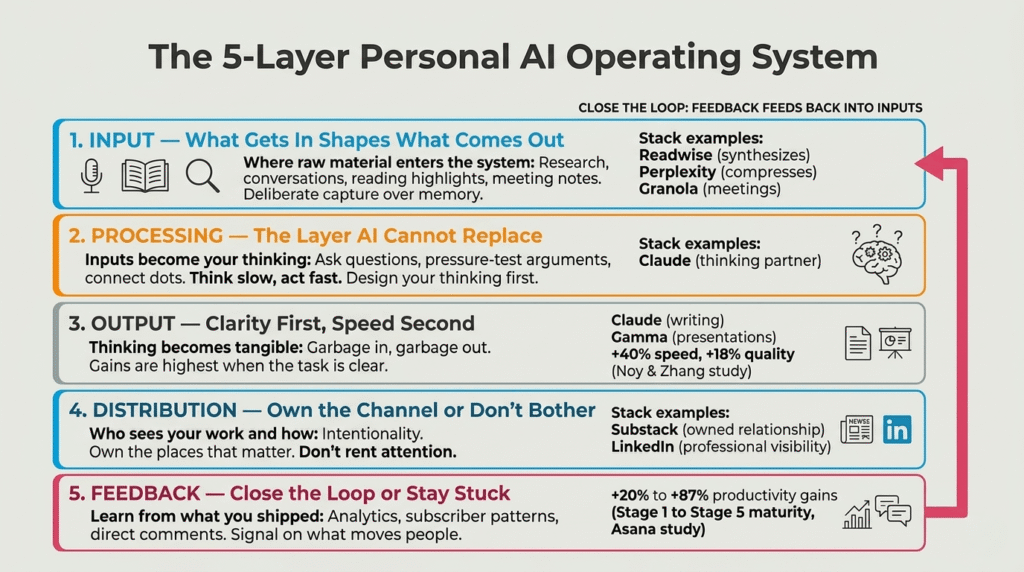
Layer 1: Input — What Gets In Shapes What Comes Out
Where raw material enters the system. Research, conversations, reading highlights, meeting notes, market signals. If you’re not capturing deliberately, you’re depending on memory.
Memory is a terrible system.
My stack: Readwise synthesizes everything I read. Perplexity compresses research from hours to minutes. Granola captures meetings so I’m present in the conversation instead of typing.
The question: What signals are you capturing right now — and which ones evaporate because you have no system for them?
Layer 2: Processing — The Layer AI Cannot Replace
This is where captured inputs become your thinking. You ask questions. You pressure-test and connect dots that only someone with your experience can see.
My stack: Claude is my primary thinking partner. Not for answers. For better questions. I use it to stress-test arguments, surface patterns, analyze data I’d otherwise eyeball. But the judgment call? Always mine.
Bent Flyvbjerg calls the right approach “think slow, act fast.” Design your thinking before you speed up execution. Otherwise you’re just wrong at higher velocity.
When you open Claude or ChatGPT, do you know what you’re trying to think about? Or are you just typing and hoping?
Layer 3: Output — Clarity First, Speed Second
Where thinking becomes tangible. Articles, emails, presentations, code. Most people start here — and that’s backwards. Output quality gets determined by what happened in Layers 1 and 2.
My stack: Claude for writing and analysis. Gamma for presentations. But I craft the core message myself. Always.
Research from Noy and Zhang, published in Science, found that professionals using AI for writing were 40% faster and produced 18% higher quality work. But the gains were largest when the task was clear and the person knew what they wanted before they started.
Garbage in, garbage out. That’s not a cliché. It’s the entire game.
Starting with Layer 3 and wondering why the output feels flat? The bottleneck is almost never the output tool.
Layer 4: Distribution — Own the Channel or Don’t Bother
Who sees your work and how. This isn’t about being everywhere. It’s about being intentional — and owning the places that matter.
My stack: Substack for my newsletter (owned audience, direct relationship). LinkedIn for professional visibility. That’s it. I don’t rent attention on platforms I can’t control.
Distribution is a design choice. Most people post everywhere and own nothing.
Do you own your distribution — or are you renting space from an algorithm?
Layer 5: Feedback — Close the Loop or Stay Stuck
Where you learn from what you shipped. What landed? What fell flat? Without feedback, you’re not running a system. You’re shouting into the void and calling it a strategy.
My stack: Analytics, subscriber engagement patterns, direct comments. Not vanity metrics. Signal on what actually moves people.
Asana’s AI maturity research found that productivity gains rise from 20% at Stage 1 (random experimentation) to 87% at Stage 5 (integrated feedback loops). The difference? Not the tools. Whether you measure, iterate, and adapt — or set-and-forget.
Robert Greene: “Concentrated practice over time cannot fail but produce results.”
The more reps through a designed system — with real feedback feeding back into the input layer — the stronger every layer gets. That’s how systems compound.
Back to the Kitchen: Why AI Architecture Beats AI Apps
Remember that chef?
The secret wasn’t better knives. It was mise-en-place — everything in its place before the flame went on. The system made the tools useful, not the other way around.
Microsoft’s Work Trend Index found the same pattern at scale. “Frontier Firms” — organizations that redesign workflows around AI — see leaders 71% more likely to say their company is thriving. Their employees are twice as likely to take on meaningful work.
Meanwhile, reports suggest 42% of companies abandoned most of their AI initiatives this year. Not because the technology failed. Because they never set up the station.
My stack will look different in six months. Yours will too. New models, new tools, new shiny demos. That’s fine. The five-layer architecture won’t change because it’s not about the tools.
It’s about how the work moves.
Here’s what I’d do this week. Grab a blank page. Write the five layers: Input, Processing, Output, Distribution, Feedback. Under each, write what you’re currently using. Then ask: where’s the gap? Where am I strong? Where am I completely winging it?
That exercise takes twenty minutes. It’ll save you months of tool-shopping.
Which layer is your biggest bottleneck? Reply and tell me. I read every one.
A personal AI operating system is a five-layer architecture for organizing AI tools into a deliberate workflow: Input (capture), Processing (thinking), Output (creation), Distribution (sharing), and Feedback (learning). Instead of collecting disconnected tools, it designs how work moves from raw material to finished output — like a chef’s mise-en-place for knowledge work.
Slack’s Workforce Index found workers using AI spent 37% more time on routine admin when workflows weren’t redesigned. Without a system, AI just makes you faster at the wrong things. Wrike’s 2025 research found that 82% of employees use AI tools — but most operate in isolation, recreating the inefficiencies they were meant to solve.
Map your actual workflow into five layers: what you capture (Input), how you think (Processing), what you create (Output), where you share it (Distribution), and how you learn from results (Feedback). Then assign each AI tool to a specific layer based on what it actually accelerates in your workflow.
Yes. Harvard Business School research found that domain experts scored 3.96/5 with AI assistance while non-experts scored 3.42/5 using the same AI model. BCG’s research shows 70% of AI value comes from people and processes, not the technology itself. Experience is the multiplier — not the tool.
Start with one strong input tool (for capturing research or notes), one thinking partner (like Claude for analysis and pressure-testing ideas), and a feedback mechanism (analytics or direct audience response). Build from there based on your actual workflow gaps — not trending tools.